Herdr: What Multiple Machines and Multiple Agents Actually Look Like on Screen, and the Five Places I Could Put It
In Lex Fridman #501 DHH says he replaced tmux with Herdr. The reason was not that it looks nicer. It was that he had started running agents on four or five machines, and tmux has no idea what is happening inside each pane. This page covers Herdr properly. It works out whether each pane is running, blocked waiting on you, done, or idle, and it marks that state in the sidebar. The part people get wrong is how multiple machines are displayed, so that gets its own section. The answer is that every machine runs its own server, there is no single combined view of all three, and going across machines is an SSH thin client that connects to one machine at a time. DHH's setup uses GL.iNet Comet KVMs plus Tailscale to turn machines scattered across Malibu and Copenhagen into one local network, four to five machines, about three agents each, roughly sixteen threads. The second half is my own assessment. Herdr happens to fill the one empty cell in my harness table, which is observability, and the five places I could put it are a two pane setup with Claude Code writing and Codex reviewing, one workspace per project for three projects, SSH reattach to NanoClaw on the Raspberry Pi, letting an agent use the socket API to wait for another agent to get blocked, and the old Omarchy machine at the hospital. It ends with three reasons not to rush.
In Lex Fridman #501 DHH talks about how he works, and one line in there is that he swapped tmux for Herdr. When I wrote up that episode I gave it a single line. This page fills it in.
What it solves, in one sentence
tmux does not know what is going on inside each pane.
All it does is cut the terminal into boxes and remember them for you. Whether the Claude Code in the second box is still running, or has stopped and is waiting for you to approve something, or finished ten minutes ago, tmux has no idea and will not tell you. So once you have three or four agents open, the only way to find out is to switch through them one at a time.
That is the gap Herdr fills. It is still a terminal multiplexer, but it recognises which agent is running in a pane and marks the state in the sidebar: working, blocked and waiting on you, done, or idle. When something is waiting for you it rings.
DHH's own description is efficient:
"Herdr is essentially tmux plus agent notifications. So whenever your agent is done and needs something for you, it goes ding, a little bell telling you it's ready for its human."
What the screen looks like
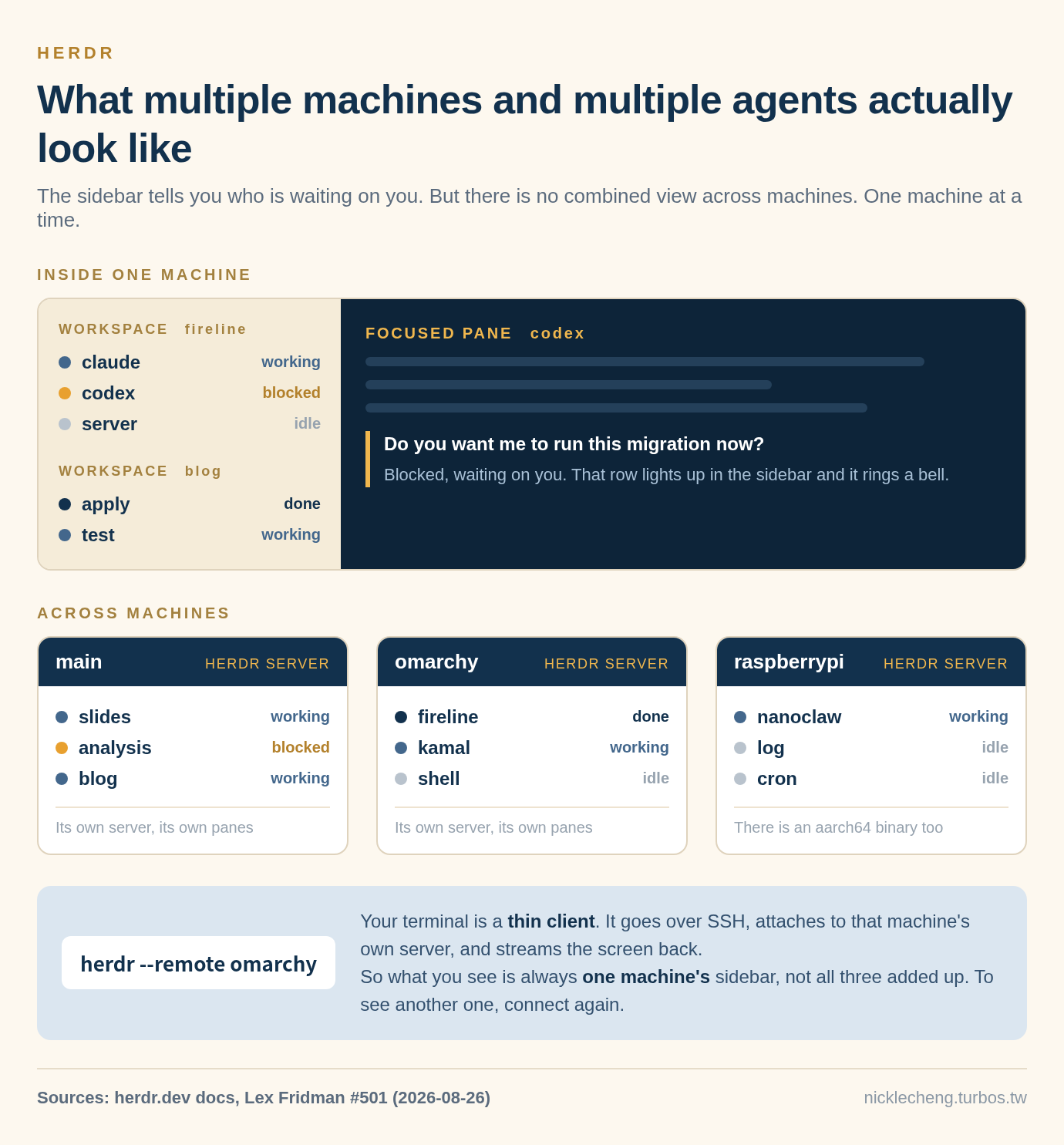
The top half is one machine. On the left the sidebar lists every pane grouped by workspace, with a state on each row. On the right is the pane you are currently looking at. The important part is the left column. You know that codex is blocked asking whether to run a migration without having to switch to it.
The bottom half is multiple machines, which is the part that gets misunderstood, so it gets the next section.
How multiple machines actually work
Start with DHH's setup, because he is the one who pushed this to its limit.
He bought a batch of GL.iNet Comet KVMs. Plug in HDMI and USB, log in through a web page once, set one password, and that machine is on his tailnet. Tailscale is WireGuard underneath, and the effect is that computers in different places all behave like one local network, with no firewall holes and no complicated VPN. He can reach machines in both the Malibu and Copenhagen offices from his phone.
Then he wired up four mini PCs from a closet, each with its own Comet:
"Suddenly I could run agents on more computers at the same time, and I could control them all with Herdr. And it did get to a point where I maxed out my own processing power."
The scale is four to five machines, about three agents each, roughly sixteen threads in total. Threads here means agents running at the same time, not CPU threads. He is borrowing the image of going from single threaded in your head to running things in parallel. He also adds something that goes against what you would expect. The faster the agents run, the fewer he can handle at once, because they come back to him more often.
But it is not one combined view
I went and checked the official docs on this one, because it is easy to assume Herdr collects the panes from every machine into a single sidebar. It does not.
Every machine runs its own Herdr server. That is what DHH describes too: "I have multiple Herdr setups actually running on individual machines." Three machines means three independent servers, each managing its own panes, none of them aware the others exist.
Going across machines is a thin client. The Herdr on your local machine connects over SSH, starts or attaches to the server on the remote machine, and streams that screen back to your terminal:
herdr --remote workbox
herdr --remote ssh://you@server:2222
herdr --remote workbox --session agents
So what you are looking at is always one machine's sidebar, not all of them added up. To see another one, connect again.
You can also run several named sessions on the same machine, each independent and each staying alive:
herdr session attach work
herdr session stop work
herdr session delete side-project
The design makes sense, because the agents run on that machine's file system and the state should not move. But it does affect how you set things up. If what you want is to see every machine at a glance, Herdr cannot give you that. Either you keep the things you use often on one machine, or you accept that you will be hopping between a few.
A few basic facts
- Open source,
herdrdev/herdr, written in Rust, Apache-2.0, started 2026-03-27. When I looked it had 35,079 stars and 2,568 forks, last push 2026-09-03, latest release v0.8.2. - DHH did not write it. Someone else did. His connection is that Omarchy Quattro ships it, and he sent in a pile of PRs to bring it up to the level of his old tmux setup. So "swapped to Herdr" in that episode means he changed the default in his own desktop, not that he built a tool.
- It does not wrap or change what you already use. Claude Code, Codex, Cursor, OpenCode all run the same. It only takes over their terminal.
- It stays alive in the background. Close the laptop, lose the network, reboot the machine, the session comes back.
- It keeps the tmux keybindings (the
ctrl+bset) and adds mouse dragging for splits. - One line to install:
curl -fsSL https://herdr.dev/install.sh | sh, orbrew install herdr, ormise use -g herdr. - There is a linux-aarch64 binary, so it installs on a Raspberry Pi. That one matters to me.
It happens to fill the one empty cell in my table
At the end of My Full Agentic Workflow I checked my own stack against the Agent = Model + Harness table. Of the six pieces, only one cell was empty:
| Harness piece | What I have |
|---|---|
| Rulefiles | CLAUDE.md, skills, Rails conventions |
| Tools | NanoClaw's MCP and OneCLI proxy, the wiki API |
| Sandbox | NanoClaw's container |
| Orchestration | Claude Code sub-agents, NanoClaw scheduling |
| Guardrails | Spectra spec artefacts, spectra-audit, Kamal health checks |
| Observability | Still missing |
What I wrote at the time was that both ends of the structure feel solid and what I am short of is the ring in the middle, the eyes that let me see what I am doing.
Herdr is not a complete answer for that cell. It does not count tokens and it does not do trajectory evaluation. But it does the most basic and most painful half: how many agents are running right now, which one is blocked, and how long it has been blocked. That is the part I currently manage with my own eyes and my own memory.
The five places I could put it
One: Claude Code doing the work, Codex reviewing, two panes and one glance
My review process already uses two models. Claude Code writes, Codex does an adversarial review. The details are in Optimising the Development Loop. What that process actually feels like is a lot of waiting. Once you hand something to Codex all you do is press keys between two boxes.
With Herdr those two boxes mark their own state and you can see who finished from the sidebar. This is the smallest and lowest risk place to start, so it is where I would start.
Two: one workspace per project, three projects
The blog, the LINE bot, and the hospital website are three separate repos, and I am often running tests on one while waiting on a Kamal deploy for another. Herdr workspaces can be pinned to different working directories, so that is three environments side by side and switching does not mean setting them up again.
The apply stage in Spectra fits this especially well, because it often runs for several minutes, you go and do something else, and then you forget to come back.
Workspaces should not only be for repos either. Making slides and analysing a problem are also me opening a Claude and waiting, and they equally deserve a slot where the state is visible. I expand on that in Running Several Projects at Once on Omarchy.
Three: NanoClaw on the Raspberry Pi
NanoClaw runs on a Raspberry Pi (see How I Built an AI Assistant on a Raspberry Pi That Writes My Blog). Herdr has an aarch64 binary so it installs, and the fact that it stays alive in the background matches exactly how I use that machine. I never sit in front of it, I always SSH in.
Right now when I SSH in to read logs that is a one off. Close it and it is gone. If I switch to connecting with herdr --remote those panes stay there, and next time I connect I am back where I was. This is also the only place I would genuinely use the multi machine part, since I only have two machines.
Four: letting an agent open its own pane
This is the most interesting one and also the one to take slowly.
Herdr has a socket API (~/.config/herdr/herdr.sock, newline delimited JSON), and an agent can use the CLI or the socket to open a new pane, send a prompt to another agent, and wait until another agent is actually blocked before doing anything. Like this:
herdr workspace create --cwd ~/project --label api
herdr agent wait w1:p1 --until done
herdr pane read w1:p1 --source recent --lines 50
agent wait --until blocked is worth remembering. It does not wait for "finished", it waits for "stuck and needs a human", which is exactly the event my scheduled tasks most want to know about. NanoClaw's scheduling today is time triggered with a script doing a pre check. If I ever want it to babysit a long running development job, this interface is a lot cleaner than polling logs myself.
That said, I am keeping this as a direction rather than something to do now. It gives an agent the ability to start new processes, and I want the boundaries worked out first.
Five: the old Omarchy machine at the hospital
The machine I put Omarchy 4 on is an old one (see Omarchy 4 in Practice). Quattro ships Herdr already, it sits alongside tmux, and the keybindings line up, so that machine does not need anything installed. It is there when you open it.
That machine is my try things out machine, which makes it the right place to get used to Herdr before deciding whether to move it into the main workflow.
Three reasons not to rush
Do not open tmux inside a Herdr pane. This is a documented trap. Once you nest them the agent state detection stops working, so you have installed it and lost the one thing it is for. Run the agent directly in the Herdr pane.
It is still 0.x. v0.8.2, and the project only started in 2026-03, so the interface and the behaviour can still change. Fine in a development environment. Do not tie any production process to its socket API.
My bottleneck may not actually be pane management. DHH is on four to five machines and sixteen threads, and at that scale the tool decides whether you survive, and he had to build out KVMs and a tailnet before it could even hold together. My situation is that I have a hospital job during the day, I usually have two or three agents open, and I have two machines. Honestly, what hurts right now is more likely "I can only review one thing at a time" than "I cannot find which box is stuck".
So my read is this. Places one and five first, since they cost almost nothing. Place two whenever it comes up naturally. Place three when I actually want to watch NanoClaw on the Pi. Place four is a direction for later. And if I try it and the sidebar state makes no difference to me, that means I am not at the volume where I need it, which is also useful to know.
Where this lands
The value of Herdr is not that it is good at arranging boxes. It is that it knows whether the thing inside a pane is alive or dead. That is the same direction I have been going with the harness all along. However smart the model is, if you cannot see what it is doing you cannot manage it.
The multiple machines part is a separate reminder. DHH gets to sixteen threads on more than a multiplexer. It is KVMs, a tailnet, four machines, and then an interface that shows state, all of it together. The tool is only the last layer.
Related pages
- Running Several Projects at Once on Omarchy: Two Layers
- My Full Agentic Workflow: NanoClaw + Claude + Spectra + Rails
- Omarchy 4 in Practice: What Is Good, What Is Not, and a Keyboard Shortcut Cheat Sheet
- Chinese version of this page
The following pages only exist in Chinese for now:
- Lex Fridman #501: DHH on agentic engineering, testing models, and the Linux desktop
- How I Built an AI Assistant on a Raspberry Pi That Writes My Blog
- Optimising the Development Loop: grill-me, Spectra, Codex adversarial review
Sources
github.com/herdrdev/herdr(figures from the GitHub API, 2026-09-04)herdr.dev/docs/persistence-remote/,herdr.dev/docs/socket-api/- Lex Fridman Podcast #501 (2026-08-26) transcript