Wiki
Personal knowledge base
Knowledge GraphAuthorize this device
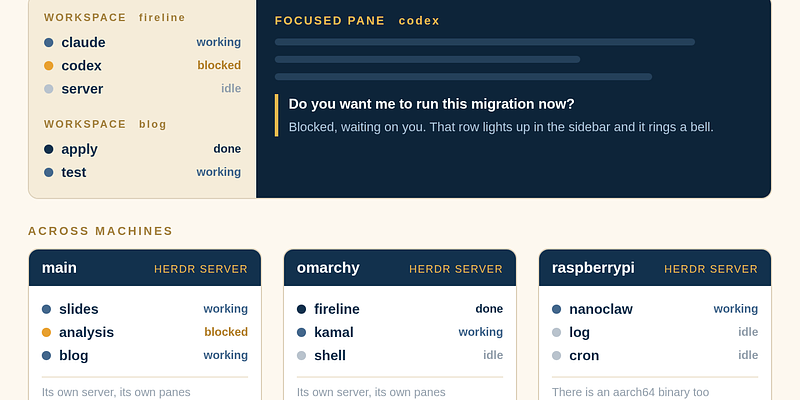
Herdr: What Multiple Machines and Multiple Agents Actually Look Like on Screen, and the Five Places I Could Put It
In Lex Fridman #501 DHH says he replaced tmux with Herdr. The reason was not that it looks nicer. It was that he had started running agents on four or five machines, and tmux has no idea what is happening inside each pane. This page covers Herdr properly. It works out whether each pane is running, blocked waiting on you, done, or idle, and it marks that state in the sidebar. The part people get wrong is how multiple machines are displayed, so that gets its own section. The answer is that every machine runs its own server, there is no single combined view of all three, and going across machines is an SSH thin client that connects to one machine at a time. DHH's setup uses GL.iNet Comet KVMs plus Tailscale to turn machines scattered across Malibu and Copenhagen into one local network, four to five machines, about three agents each, roughly sixteen threads. The second half is my own assessment. Herdr happens to fill the one empty cell in my harness table, which is observability, and the five places I could put it are a two pane setup with Claude Code writing and Codex reviewing, one workspace per project for three projects, SSH reattach to NanoClaw on the Raspberry Pi, letting an agent use the socket API to wait for another agent to get blocked, and the old Omarchy machine at the hospital. It ends with three reasons not to rush.
Running Several Projects at Once on Omarchy: Two Layers, Workspaces for Where I Am, Herdr for Who Is Waiting on Me
I usually have several things open at once. A slide deck I am editing, a problem I am looking into, and something unfinished on the Rails blog. This page is how I fit that into Omarchy. One thing has to be said first. All three of those are done with Claude. The action is the same every time, I open a Claude, give it the context, wait, and review what comes back. So all three projects belong in Herdr, not just the coding one. The real difference is not the tool, it is whether I have to be there. Slides are short rounds and I look at almost every one. Analysis needs me at the start to feed context and can run on its own after that. Development I can hand off and walk away. The core split is that Hyprland workspaces answer which project I am in, and Herdr answers who inside that project is running and who is blocked on me. My layout is workspace 1 for interruptions, 2 to 4 one project each with no distinction between slides, analysis, or code, 5 as a shared material desk, 9 for long running jobs, and 6 to 8 deliberately empty. Then six keys that actually save time, and two keys that hurt. The last section is honest about the goal. None of this lets me do more at once. What it does is cut the switching cost and stop me from missing the pane that has been waiting on me.
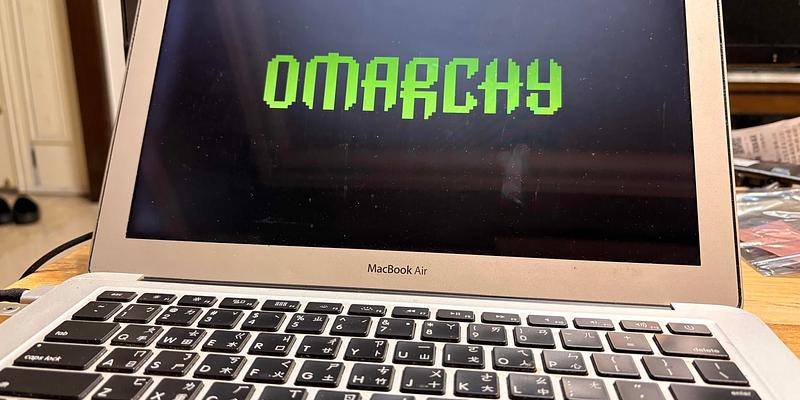
Omarchy on a 2012 MacBook Air: Installed in 6 Minutes, Now It Is My Everyday Portable Machine
A 13-inch MacBook Air from Mid 2012, i5-3427U, HD Graphics 4000, 8 GB of RAM, a 1440x900 non-Retina screen. I put Omarchy 4.0.1 on it. The installer finished in 6 minutes and 0 seconds. After the reboot I got Hyprland 0.56.2, 957 packages, and 1.99 GiB of memory used while idle. This page is what actually happened during the install and how it feels to use, not a spec comparison. The short version is that the machine is now a real portable work machine. I record screencasts on it, I write Rails on it, and I run AI agents on it. I also used the Claude skill that ships with Omarchy to add the two, three, and four finger trackpad gestures and to wire up F1 to F12 for screen brightness, keyboard backlight, and volume. That part surprised me the most because those two things used to be the worst part of putting Linux on a Mac. There is also a side story. The Omarchy install menu has a Windows on Docker option. I clicked it without knowing what it was, it really installed a full Windows 11 through Docker, it took over an hour, and it did work, but the CPU went past 200 percent on a two core machine so I removed it. At the end I list the limits that come from the age of the hardware, such as the 1440x900 screen when the Omarchy defaults assume a high resolution display.
Omarchy 4 in Practice: What Is Good, What Is Not, and a Keyboard Shortcut Cheat Sheet
I installed Omarchy 4.0.1, the Arch plus Hyprland desktop made by DHH, on an old machine from 2018. This page is what it is like to actually use it, plus the keyboard shortcuts written out as tables, taken from the 227 bindings on my own machine. On the good side, what it really saves is not install time, it is the few hundred decisions you would otherwise have to research and wire up yourself. An eight year old machine runs it fine, and 4.0 moved the whole internals from git dotfiles to pacman packages, rewrote the desktop shell in Quickshell, and switched the Hyprland config to Lua. On the bad side I am not being polite. Arch rolling updates really can break things and it is on you. A rewrite this big brought a batch of new regressions, including kernel panics after upgrade, closing the lid with an external monitor killing every GUI program, keyboard layout resetting after suspend, and idle inhibit getting lost. NVIDIA is community supported. The manual assumes you have a 2x display. And the taste and the governance of the whole project are tied to one person. There is a separate section on Chinese input, because Omarchy ships fcitx5 but you have to install the engine yourself, and the default keyboard options break the single Shift press that switches between Chinese and English. The shortcut section starts from the modifier grammar, which is worth more than memorising 227 bindings. There is also a section from 2026-08-30 asking what Omarchy is trying to become, comparing it with OpenClaw and NanoClaw. The short answer is that the direction holds but the category does not.
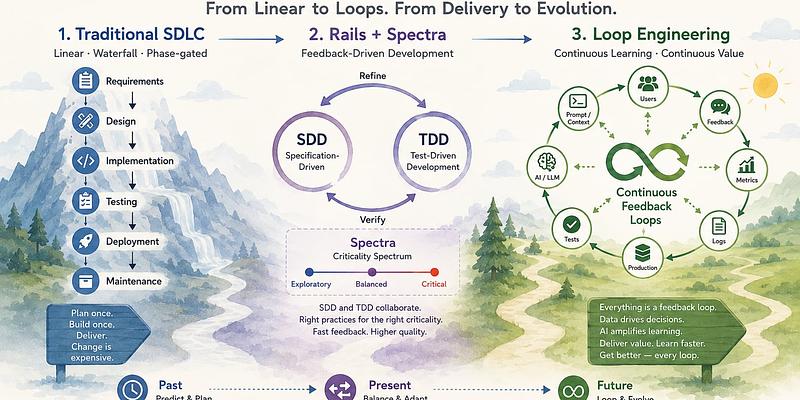
What Is Loop Engineering?
Take on the new term loop engineering (the shift from prompt→context→harness→loop, traced to Boris Cherny and Peter Steinberger), put on one table with TDD/SDD. TDD/SDD are the source of truth; loop engineering is the wiring of the iteration, and TDD/SDD are exactly the verify-and-stop step inside the loop. Maps onto my own Spectra (SDD plus a human reviewer) and Rails (the substrate that makes loops converge). Closes with the honest doubt: is this just hype to make you burn more tokens? Answer: it cuts both ways. The marketing version (more autonomy) burns tokens, the engineering version (faster convergence, stop when you should) saves them.
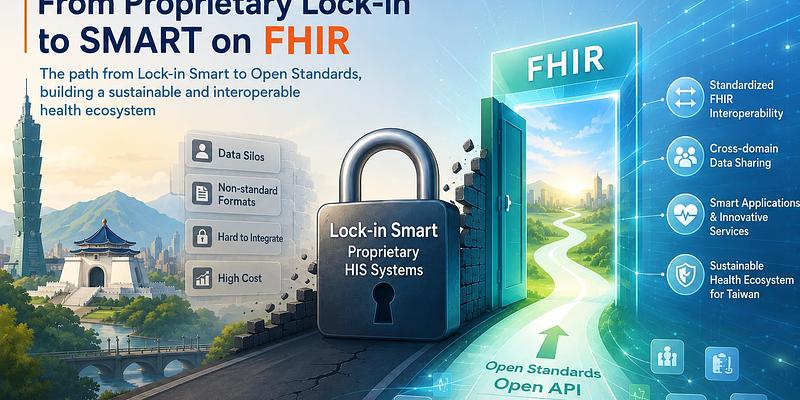
Taiwan's HIS Proprietary Lock-in, and Why SMART on FHIR Is the Only Way Out
This is the English version of a piece about something I deal with every day in a hospital IT office, that every hospital in Taiwan runs its own Hospital Information System, each incompatible with the next. I call this phenomenon proprietary lock-in, which most people would recognize as data silos. Each hospital has its own data model and an interface only its original vendor understands, so you cannot pull records across hospitals, and adding any new feature means going back to that vendor, which is slow and expensive, and AI and innovation simply cannot get in. I argue you cannot solve this by wiring up one more interface, the only way out is to converge the data model and the access method onto an open standard, namely FHIR. But FHIR alone is not enough. What actually breaks vendor lock-in is SMART on FHIR, which adds OAuth2 authorization and an app-launch mechanism on top of FHIR's data and API, so any standard-compliant app can attach safely to any hospital's system, write once and run anywhere. The US used the 21st Century Cures Act to mandate that EHRs open this API, Epic and Cerner both support it, and it is already the de facto standard. Taiwan has the MOHW's TW Core IG as a foundation, so the direction is right, what blocks us is sunk investment and vendor incentives. The piece explains where lock-in came from, what it costs, why standardization is the only fix, and why it is SMART on FHIR and not just FHIR, and it is honest about the real obstacles to landing this in Taiwan.

Sega on AI EP1, Annotated: Is Taiwan an AI Superpower or an AI Foundry?
A conversation between iKala founder Sega Cheng and Dr. Lee-Feng Chien, former MD of Google Taiwan. From the Computex-fueled Capital Island phenomenon through whether AI is a bubble, the agent era as a hard requirement, a projected 24x jump in token consumption by 2030 and hardware optimization, US East vs West views, Taiwan's five shortages and internationalization by acquisition, luckily Taiwan's software was weak, Agentic Commerce and the Zero-Click economy with GEO, and R&D compressed from ten years to six months. Closes with the Ask / Use / Manage / Build framework for becoming the 1%.

The Digital-Transformation Evangelist: Making a Hospital's IT Quietly Better
I half-jokingly call myself the hospital's digital-transformation evangelist. Preaching here is not shouting slogans on a stage. It is quietly getting electronic records, FHIR interoperability, security, and AI assistance right, one piece at a time, until clinicians and patients suddenly notice things got smoother.

Hand-Grinding and the Sweet Finish: The Latte After a Week of Rest
I hand-grind an Italian espresso blend from a small local roaster. After a week of resting the beans, the latte finally pours stable. A quick engineer's test of the claim that plain water makes coffee taste sweeter, and a note on tidying up variables and handing the rest to time.
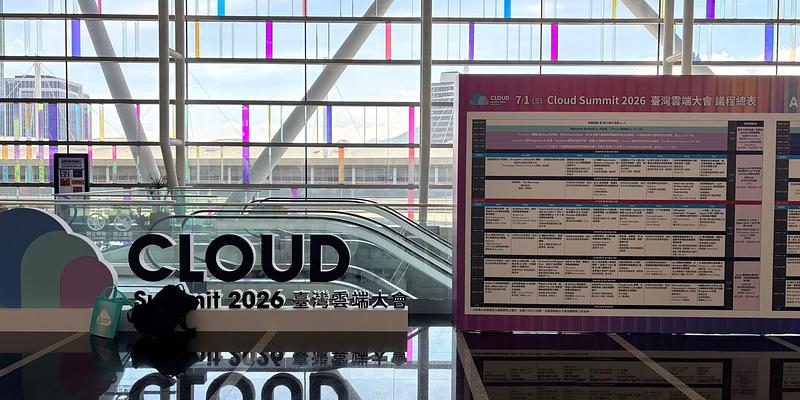
Talk Notes: SMART on FHIR Meets LINE Bot, a Privacy-First Medical AI Architecture
My write-up of the talk I gave at the 2026 AI Enterprise Summit (iThome). People in Taiwan live inside LINE, so if patients are ever going to read their own records, the records have to reach them there. I walk through the identify, confirm, authorize identity chain behind that simple wish, and why the security ceiling is set by the weakest anchor, the in-hospital binding, not by the cryptography.